MTD for sole traders and the self-employed: are you in, and when
Checked against GOV.UK on 14 August 2026 · Applies from 6 April 2026 onwards.
“now I feel very stressed as I have never used any accounting software and doubt I can despite having had a computer for 34 years”
We hear this most. someone who has filed on paper since the 1990s, OpenRent Community forum, 31 July 2026 — someone in the same position as you.
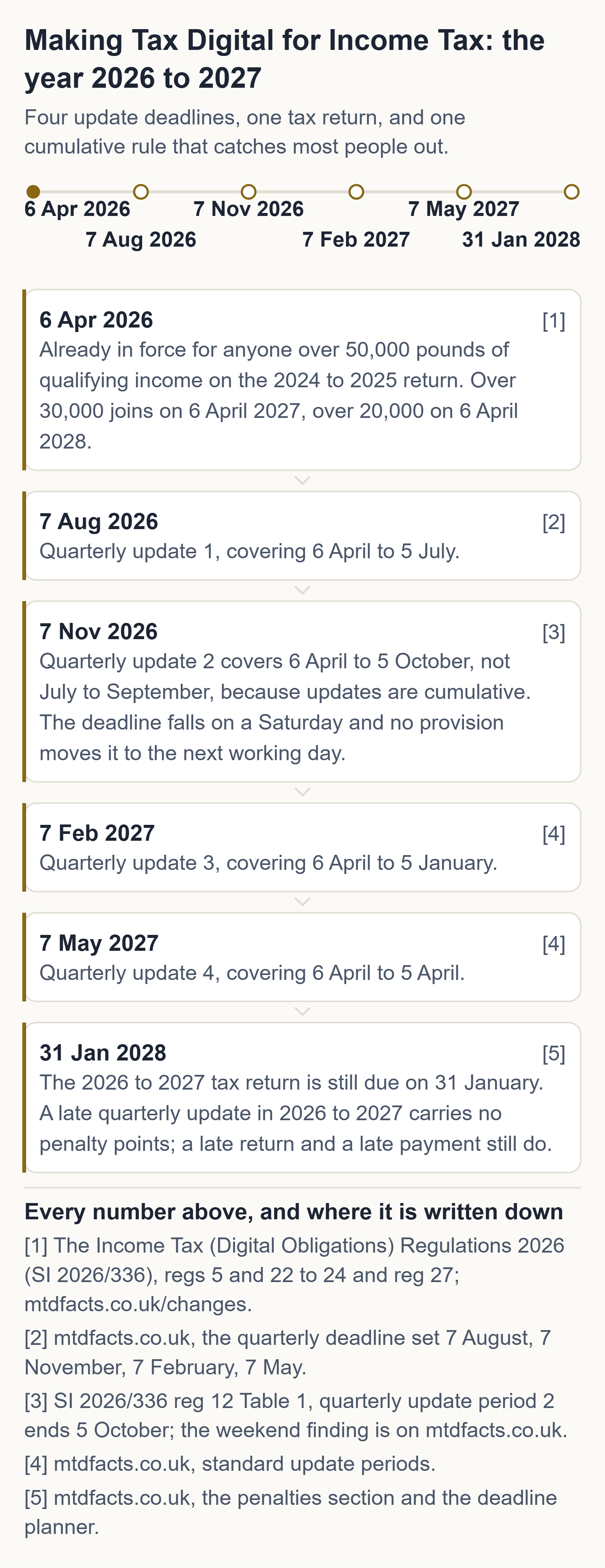
If you are in, these are your dates — and they are the same whatever you do for a living. Your next quarterly update is due 7 November 2026, and because updates are cumulative it covers 6 April to 5 October 2026 — so it also catches up 7 August 2026 if you missed it. Your tax return for 2026 to 2027 is due 31 January 2028, and that one is still in the points system. And from September 2026 HMRC has been signing people up itself, in stages, if they had not signed up.
You are not alone, and this is the measured version of that sentence. HMRC put 864,000 sole traders and landlords in scope for this tax year (HMRC, 5 February 2026), and reported on 12 August 2026 that 436,000 had sent a first quarterly update and 570,000 had signed up. We have not subtracted one from the other to make a "how many are behind" headline — they were published six months apart and count different things — but you can see the size of the room you are standing in.
What to do tonight
twenty minutes, tonight, with last year's return open
- Take your turnover, not your profit, from the tax return you filed last. Making Tax Digital is measured on money in, before a single expense comes off.
- Add any rental income to it — even one let flat counts, and it is added to the trade rather than kept separate.
- Run the total through the free checker. If it puts you in, your next date is 7 November 2026.
None of those three steps costs money. Anyone charging you to do them is selling you something HMRC gives away.
Where these come from, on GOV.UK: quarterly updates and their deadlines · the tax return · who has to use MTD, and when · working out qualifying income · the recognised-software finder · what to do if HMRC signed you up.
The three lines, and the return each one is measured on
| Qualifying income | On the tax return for | You must use MTD from |
|---|---|---|
| Over £50,000 | 2024 to 2025 | 6 April 2026 — already in force |
| Over £30,000 | 2025 to 2026 | 6 April 2027 |
| Over £20,000 | 2026 to 2027 | 6 April 2028 |
| £20,000 or less | — | Automatically exempt, unless your circumstances change |
Qualifying income is gross self-employment income plus gross property income, before expenses, taken from the tax return you filed in the previous tax year. Sources: find out if and when you need to use MTD and work out your qualifying income (GOV.UK).
The free route, before anyone sells you a subscription
HMRC publishes the official list of software recognised for Making Tax Digital for Income Tax, and its own guidance says plainly that “free products are available for those with simple tax affairs”. We drove that finder ourselves on 1 September 2026 and it returns recognised products costing £0 — for sole traders and for landlords, including bridging tools that submit straight from a spreadsheet you already keep. We take no commission from any of them, we rank none of them, and this site carries no affiliate links.
HMRC's official software finder (gov.uk) · how bridging software works · the free two-number check · your own four dates
Signing up for Making Tax Digital is free at GOV.UK. So is the checker on this page, and so is every answer on this site.
For sole traders the sharpest edge of MTD is multiple trades. The threshold test combines your businesses; the reporting keeps them apart.
One set of records per business
If you have more than one sole trader business, for each source of self-employment income you must create separate digital records and send separate quarterly updates. HMRC's example is someone who is an electrician as well as a driving instructor: one set of records for each business, and separate quarterly updates for each.
But one number for the threshold
Qualifying income adds all your self-employment and property income together, before expenses. Two businesses at £30,000 turnover each is £60,000 of qualifying income — over the £50,000 line, even though neither business is.
Penalty points do not multiply
You can only get one penalty point per deadline. That applies even if you have more than one business and send more than one quarterly update late.
The trading income allowance
If you claimed the trading income allowance on your last tax return you still keep digital records of that self-employment income and include it in your quarterly updates, then claim the allowance in the tax return. HMRC's example: property income of £60,000 plus £1,900 of self-employment side income declared for 2024 to 2025 means keeping digital records of both in 2026 to 2027, because the self-employment income was above the trading allowance threshold.
You do not need digital records of self-employment income if both apply: it was below the trading income allowance threshold, and you did not declare it on your previous return.
A first year shorter than 12 months
HMRC will annualise a sole trader's qualifying income where it has the information — six months of trading in the first tax year is doubled to find the annual figure.
What you need to sign up
Your business name as used on your invoices, your business address, the nature of your business, and your business start date if it is within the last 2 tax years. With multiple businesses, check each one in the online service and add any that are missing.
Questions people ask
Do I send one MTD update for two businesses?
No. Each self-employment business needs its own digital records and its own quarterly update. Qualifying income, however, is all your businesses added together.
Can I get two penalty points for one late deadline?
No. Only one penalty point per deadline, even with several businesses filing several updates late.
Do I need a separate bank account for Making Tax Digital?
No, a separate business account is not required — though on some products the free price is conditional on holding a particular bank account, which is a pricing condition rather than a rule.
How much will Making Tax Digital cost?
Signing up costs nothing, and the software can too: free versions of recognised products exist, each with a stated condition attached.
Will my accountant do Making Tax Digital?
An agent can sign you up through the agent route and send the quarterly updates for you, but the duty stays yours, so agree in writing who sends what and by when.
What are the new rules for self-employed?
If you are self-employed with gross income over the threshold for your phase, you keep digital records, send a summary of income and expenses each quarter, and finish with a final declaration.
How much does MTD cost?
Nothing to sign up, and nothing for software if you can meet the condition on one of the free recognised products; the paid plans buy bookkeeping features rather than compliance.
What is the best MTD software for sole traders?
We rank nothing and take no commission — for a sole trader the two conditions that remove a free tier more often than any other are being VAT registered and needing an agent licence.
Do I need to register for MTD with HMRC?
Yes, signing up is a separate step on GOV.UK, done with your Self Assessment user ID once you have chosen compatible software, and it is free.
Will my accountant do my MTD?
They can, through the agent services route, and they can sign you up as well — but check whether your product carries an agent licence, because the single-user free tiers do not.
Andrew at Axion Labs
The thing worth saying plainly is that Making Tax Digital doesn't change what you owe or when you pay it. It changes how you report — same figures, sent four times instead of once, from software instead of a form. If you've filed your own return for years, you already know the hard part. What's left is picking a tool, and there are recognised ones that cost nothing.
Sources
- Use Making Tax Digital for Income Tax: create digital records (HMRC guidance)
- Work out your qualifying income for Making Tax Digital for Income Tax (HMRC guidance)
- Penalties for Making Tax Digital for Income Tax (HMRC guidance)
- Sign up for Making Tax Digital for Income Tax (HMRC guidance)
General information about UK tax rules, not tax advice. Your own circumstances and HMRC's official guidance govern your position. If you are unsure, speak to an accountant or contact HMRC. Tax rules change — if this page is more than a few months old, check the GOV.UK pages linked above. Found an error? Email hello@getaxionlabs.com and we will correct it.
← All Making Tax Digital answers
Thank you. That goes straight to the person who writes these pages.
That didn't send — try once more.