Free to read. No sign-up, no cookies, no trackers. We never ask for your name, National Insurance number, or tax figures — the tools on this site run entirely in your browser.
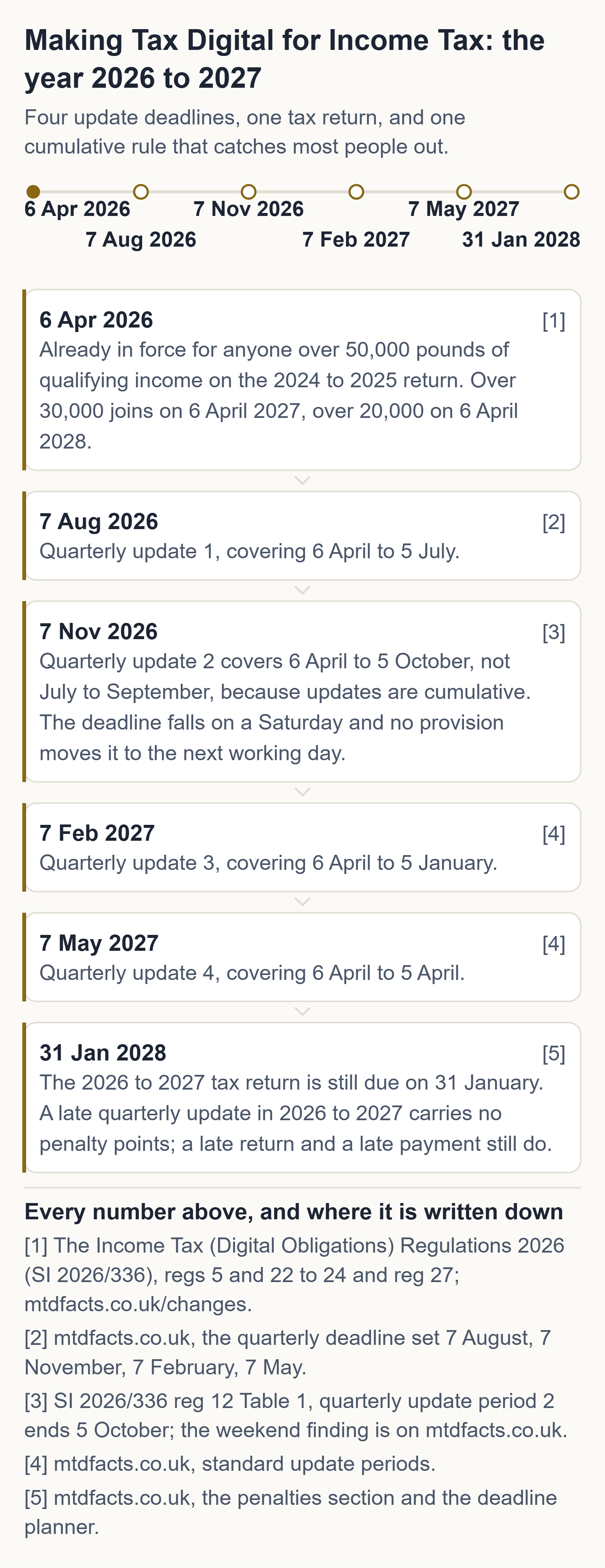
If Making Tax Digital applies to you, three dates matter and nothing else does. Your next quarterly update is due 7 November 2026, and because updates are cumulative it covers 6 April to 5 October 2026 — so it also catches up 7 August 2026 if you missed it. Your tax return for 2026 to 2027 is due 31 January 2028, and that one is still in the points system. And from September 2026 HMRC has been signing people up itself, in stages, if they had not signed up.
You are not alone, and this is the measured version of that sentence. HMRC put 864,000 sole traders and landlords in scope for this tax year (HMRC, 5 February 2026), and reported on 12 August 2026 that 436,000 had sent a first quarterly update and 570,000 had signed up. We have not subtracted one from the other to make a "how many are behind" headline — they were published six months apart and count different things — but you can see the size of the room you are standing in.
What to do tonight
twenty minutes, tonight, with last year's tax return in front of you
- Find your gross self-employment income and your gross property income on the tax return you filed last — the totals before any expenses. Those two numbers, added together, decide everything else.
- Put them into the free checker on this site. It runs in your browser, asks for nothing else, and tells you whether you are in and from which April.
- If it says you are in, write 7 November 2026 on your calendar tonight. That is the next thing that is actually due.
None of those three steps costs money. Anyone charging you to do them is selling you something HMRC gives away.
Where these come from, on GOV.UK: quarterly updates and their deadlines · the tax return · who has to use MTD, and when · working out qualifying income · the recognised-software finder · what to do if HMRC signed you up.
The free route, before anyone sells you a subscription
HMRC publishes the official list of software recognised for Making Tax Digital for Income Tax, and its own guidance says plainly that “free products are available for those with simple tax affairs”. We drove that finder ourselves on 1 September 2026 and it returns recognised products costing £0 — for sole traders and for landlords, including bridging tools that submit straight from a spreadsheet you already keep. We take no commission from any of them, we rank none of them, and this site carries no affiliate links.
HMRC's official software finder (gov.uk) · how bridging software works · the free two-number check · your own four dates
Signing up for Making Tax Digital is free at GOV.UK. So is the checker on this page, and so is every answer on this site.
If the check says you are in, the MTD Readiness Checklist at £7.99 is one sitting that ends with a written list of what is done and what is not. It is the second button at the top of this page. Every answer, every calculator and every endpoint here is free and stays free.
The one-line rule
If you are a sole trader or landlord registered for Self Assessment, add up your gross self-employment income and gross property income — before any expenses. That number, on the tax return shown below, decides everything.
| Qualifying income | On your tax return for | You must use MTD from |
|---|---|---|
| Over £50,000 | 2024 to 2025 | 6 April 2026 — already in force |
| Over £30,000 | 2025 to 2026 | 6 April 2027 |
| Over £20,000 | 2026 to 2027 | 6 April 2028 |
| £20,000 or less | — | Automatically exempt, unless your circumstances change |
Employment (PAYE) income, a partnership profit share, dividends, the State Pension and private pensions do not count towards that figure. Partnerships are not in MTD yet.
Check my position — two numbers, no sign-up →A common misunderstanding
Making Tax Digital does not replace the tax return, and it does not mean paying tax quarterly. A quarterly update is a summary of income and expense totals generated by your software. HMRC never sees an individual receipt. You still file one tax return, by 31 January, and you still pay on the same dates as before.
Missed 7 August? Been signed up by HMRC?
A late quarterly update in 2026 to 2027 carries no penalty — but your 2026 to 2027 tax return, due 31 January 2028, is still in the points system, and the waiver does not remove the obligation to file. The recovery hub sets out what it costs, who is not actually mandated, and the six-step catch-up, with a calculator for a common error: your next update covers 6 April to 5 October, not July to September.
→ Missed the deadline — what happens now
If you are behind and want the deadline table, the free-software route and the catch-up in one page, start at behind on MTD.
Happening right now
HMRC said on 12 August 2026 that from September 2026 it will begin signing up, in stages, customers who need to use MTD for the 2026 to 2027 tax year but have not signed up themselves. HMRC's reason for signing up first: you get to choose the software and check your details are right.
HMRC also reported that more than 436,000 people had sent a first quarterly update and more than 570,000 had signed up. In February 2026 HMRC put the number facing the new rules at 864,000.
And the part that surprises people
There are no penalty points for late quarterly updates in the 2026 to 2027 tax year. Late tax returns and late payments are not covered by that, and you still cannot file your tax return until your updates are in.
Free tools
Am I in MTD?
Two numbers and a tax year. Applies HMRC's thresholds and automatic exemptions and tells you your start date. Runs in your browser — the figures never leave your device.
Quarterly deadline calculator
Your four update deadlines, the exact cumulative period each one covers, and which of them fall at a weekend — two of the four do in 2026 to 2027, and nothing in the regulations moves them. Calendar export with reminders included.
Stopped trading, sold up, or moved abroad?
Ending a source starts a short clock nobody is told about: one final shortened update, and notice to HMRC of the date it stopped by that period's deadline. Stop on 20 November 2026 and your notice is due 7 February 2027.
Deadline planner with calendar export
Scope check and personal deadline table in one — including foreign property income, which HMRC's own checker does not ask about, how many separate quarterly update streams you file, and a one-click calendar download with built-in reminders.
The questions people actually type
Every page on the site — the 35 answers, the four free calculators, the recovery hubs and the packs — is listed in one place on the full index.
How this site is paid for
Everything above is free and stays free. Of the pages here, 2 are paid. The MTD Readiness Checklist, 25 checkboxes, is for someone who has just found out they are in and wants their own position written down. The MTD Survival Kit is a spreadsheet, an 11-page walkthrough and a calendar file, for someone who is behind and wants the catch-up done in one sitting. Each is paid once. No subscription, and no monthly fee. A filled, adding-up sample of the kit's spreadsheet, with its arithmetic printed, is on its page above the price. No ads, no affiliate links, no commission from any software provider, and nothing charged for anything HMRC provides free.
Andrew at Axion Labs
I built this site because my own first read of the MTD guidance took an afternoon and left me less sure than when I started. The rules aren't secret — they're all on GOV.UK — they're just spread across a dozen pages, and the answer to one ordinary question is usually split across four of them. So: one question, one page, sources at the bottom, and the date I checked them. If something here reads as wrong to you, it might be. Tell me and I'll fix it that day.
General information about UK tax rules, not tax advice. Your own circumstances and HMRC's official guidance govern your position. If you are unsure, speak to an accountant or contact HMRC. Every page names the GOV.UK source it came from and the date we checked it. Found an error? Email hello@getaxionlabs.com and we will correct it.
Thank you. That goes straight to the person who writes these pages.
That didn't send — try once more.