Free to read. No sign-up, no cookies, no trackers. We never ask for your name, National Insurance number, or tax figures — the tools on this site run entirely in your browser.
HMRC auto-sign-up guidance read on GOV.UK on 2 September 2026 · free-software check run on HMRC's own finder on 1 September 2026 · the underlying quarterly-update rules from our GOV.UK corpus, last checked 7 October 2026
If you are behind on Making Tax Digital, the next quarterly update is due 7 November 2026 — and because updates are cumulative, that one submission also catches up the quarter you missed. This page gives you the deadline table, what an update actually contains, and the free HMRC-recognised software route, before it mentions anything we sell.
Your next quarterly update is due 7 November 2026 and covers 6 April to 5 October 2026; your tax return is due 31 January 2028.
What to do tonight
one sitting, tonight, and every step of it is free
- Work out what your next update has to cover. It is 6 April to 5 October 2026, due 7 November 2026 — the running total from the start of the tax year, which is the part people miss.
- Pick a recognised tool from HMRC's own list, filtering for the ones that cost £0. Only software on that list can send anything; a spreadsheet on its own cannot.
- Get your figures into one place — a spreadsheet is fine — with a date, an amount and a category against each line. That is all a quarterly update is made of.
None of those three steps costs money. Anyone charging you to do them is selling you something HMRC gives away.
Where these come from, on GOV.UK: quarterly updates and their deadlines · the tax return · who has to use MTD, and when · working out qualifying income · the recognised-software finder · what to do if HMRC signed you up.
The free route, before anyone sells you a subscription
HMRC publishes the official list of software recognised for Making Tax Digital for Income Tax, and its own guidance says plainly that “free products are available for those with simple tax affairs”. We drove that finder ourselves on 1 September 2026 and it returns recognised products costing £0 — for sole traders and for landlords, including bridging tools that submit straight from a spreadsheet you already keep. We take no commission from any of them, we rank none of them, and this site carries no affiliate links.
HMRC's official software finder (gov.uk) · how bridging software works · the free two-number check · your own four dates
Signing up for Making Tax Digital is free at GOV.UK. So is the checker on this page, and so is every answer on this site.
The two figures at the top are HMRC's own, from its news releases of 5 February 2026 (864,000 in scope) and 12 August 2026 (436,000 first updates sent). We have deliberately not subtracted one from the other to produce a "how many are behind" headline: they were published six months apart and measure different things, so that subtraction would be our arithmetic, not HMRC's finding.
1. The four deadlines, and the period each one actually covers
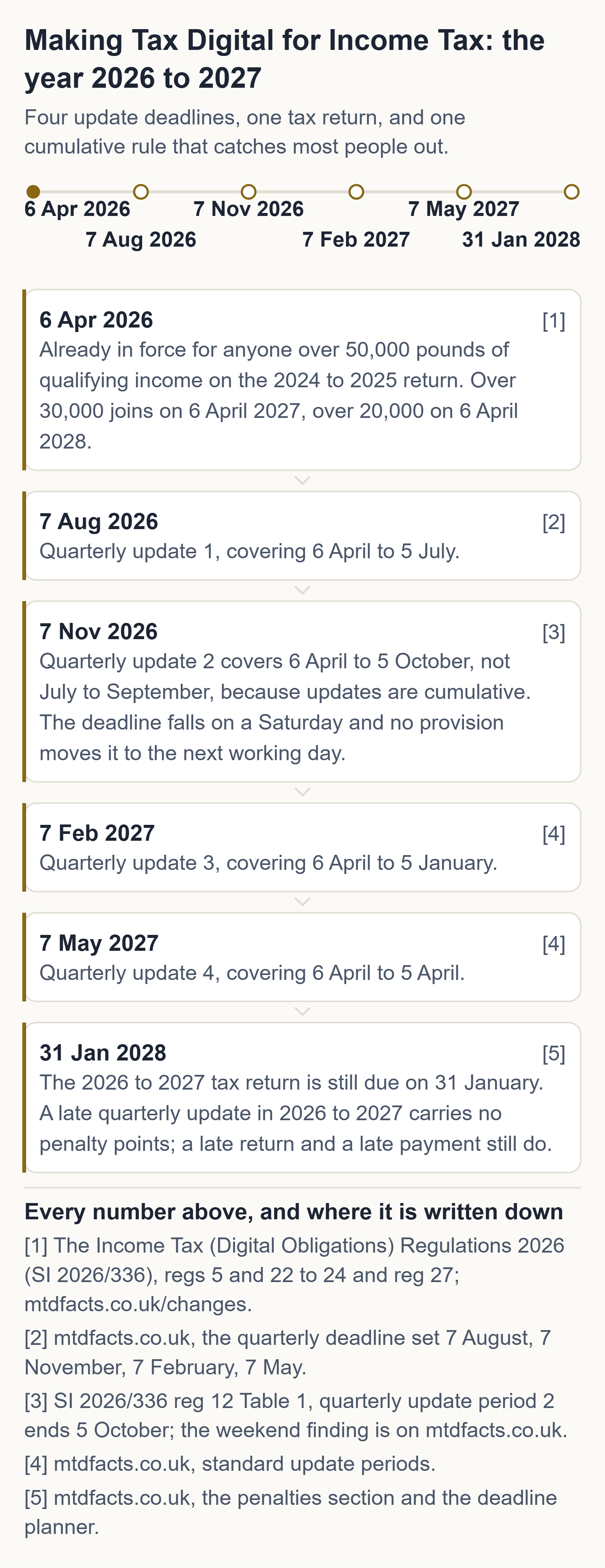
This is the table people get wrong. Every update runs from the start of the tax year to the end of that period — it is a running total, not a separate three months. Choosing calendar update periods moves the period boundaries; it does not move the deadlines.
| Update | Standard periods | Calendar periods | Deadline |
|---|---|---|---|
| 1st update | 6 April 2026 to 5 July 2026 | 1 April 2026 to 30 June 2026 | 7 August 2026 |
| 2nd update | 6 April 2026 to 5 October 2026 | 1 April 2026 to 30 September 2026 | 7 November 2026 |
| 3rd update | 6 April 2026 to 5 January 2027 | 1 April 2026 to 31 December 2026 | 7 February 2027 |
| 4th update | 6 April 2026 to 5 April 2027 | 1 April 2026 to 31 March 2027 | 7 May 2027 |
Generated from The Income Tax (Digital Obligations) Regulations 2026 (SI 2026/336), reg 12 Table 1 and reg 13 Table 2 — the same tested date logic behind our deadline calculator. Two of these four dates fall at a weekend and nothing in the regulations moves them.
2. What is actually in a quarterly update
Totals. Not receipts, and not a tax bill.
A quarterly update is a summary of income and expense totals in HMRC's categories, generated by your software. HMRC never sees an individual receipt. It does not replace your tax return and it does not mean paying tax quarterly — you still file one return by 31 January and pay on the same dates as before.
The bit that is not waived
There are no penalty points for late quarterly updates in the 2026 to 2027 tax year. That waiver is narrower than the way it gets repeated: it does not cover your tax return for 2026 to 2027, which is due 31 January 2028 and is in the points system, and it does not cover late payment. HMRC's guidance is also explicit that you cannot submit your tax return until your quarterly updates are in.
Had a letter? HMRC is signing people up automatically
HMRC published guidance on 24 August 2026 for people it signs up itself: from September 2026, anyone in scope for 2026 to 2027 who has not signed up will be signed up by HMRC, in stages, and contacted afterwards. If that is you, your overdue and upcoming quarterly updates are listed in your HMRC online account — that is the fastest way to see exactly what you owe and by when.
On penalties, that guidance says, in terms: "You will not get penalty points for missing a quarterly update deadline for the 2026 to 2027 tax year. You still need to keep digital records and send your final quarterly update for the tax year before you can submit your tax return. For the 2026 to 2027 tax year, penalty points will still apply for missing the tax return deadline."
→ Check what to do if HMRC has signed you up (gov.uk, 24 August 2026) · what it means for you
3. You do not have to pay monthly for software
Free HMRC-recognised tools exist, and we checked
HMRC publishes an official list of software recognised for Making Tax Digital for Income Tax. We drove that finder ourselves on 1 September 2026 and it returns recognised products that cost £0 — for sole traders and for landlords, including bridging tools, which submit straight from a spreadsheet you already keep. We take no commission from any of them and this site carries no affiliate links.
The one thing a spreadsheet cannot do
Only software on HMRC's recognised list can actually send an update. A spreadsheet — ours or anyone's — gets your figures submit-ready; a recognised free tool does the sending. Anyone charging you a monthly fee on the basis that MTD requires it is selling you something HMRC does not.
→ HMRC's official software finder (gov.uk) · how bridging software works
4. If you would rather not assemble all that yourself
The MTD Survival Kit — shoebox to submit-ready in one sitting
Everything above is free and stays free. The kit is the same job done for you: a bookkeeping spreadsheet already carrying HMRC's quarterly update categories as dropdowns, a Quarterly Summary that adds itself up cumulatively for all four deadlines in both standard and calendar modes, and a plain-English walkthrough of the screens from GOV.UK sign-in to the confirmation receipt.
- Excel or Google Sheets — also opens in free LibreOffice. No subscription, no account.
- Three built-in error catchers — flag a missed category, an amount dated outside the tax year, and an amount entered with no date at all.
- A filled worked example — real numbers you can check with a calculator. Every formula was machine-verified against hand-computed values before it shipped.
- 11-page walkthrough, including five free HMRC-recognised tools named, and how to re-check that list yourself so you are never dependent on ours staying fresh.
- A calendar file — all four 2026/27 deadlines with reminders, for iPhone, Google or Outlook.
The honest bit, before you spend anything
This kit does not submit anything to HMRC — only software on HMRC's recognised list can do that, and section 3 above shows you how to find one for free. The kit gets your records submit-ready and walks you to the tool that does the sending. It is a spreadsheet, a PDF and a calendar file, not software. If your records are already in order, or you are comfortable building the categories yourself, the free pages on this site are genuinely enough — that is why they come first.
5. See it filled in, before you decide
The sole-trader sheet for the first period of 2026/27, with numbers in it
This is the Quarterly Summary from the kit, filled in and adding up, for the first standard period of 2026/27. Nothing on this site should ever ask you for money before the finished thing is on screen — so here it is. Check the arithmetic with a calculator; that is what it is here for.
| HMRC category | Quarter 1 (6 April 2026 to 5 July 2026) | Cumulative to 7 August 2026 |
|---|---|---|
| Turnover / takings | £12,400 | £12,400 |
| Cost of goods bought for resale | £3,100 | £3,100 |
| Car, van and travel expenses | £640 | £640 |
| Phone, fax, stationery and other office costs | £210 | £210 |
| Accountancy, legal and other professional fees | £300 | £300 |
| Total expenses | £4,250 | £4,250 |
In the kit that cell is a formula, the categories are dropdowns taken from HMRC's own list, and the cumulative column carries forward on its own for all four deadlines — in both standard and calendar modes. Every formula was machine-verified against hand-computed values before it shipped.
These are illustrative figures in a worked example, not anybody's real accounts, and the sheet does not submit anything to HMRC. Only software on HMRC's recognised list can send an update, and section 3 above shows you how to find one that costs nothing.
6. The three versions
Sole trader
Sale price until 2 November
One payment. No subscription. No monthly fee.
Free updates for the whole of 2026/27. If HMRC changes the quarterly update categories, the deadlines or the free-tools list this tax year, we update the file in your Etsy download and message you through Etsy to tell you what changed and the date we read it. No extra charge, ever.
One business, one set of books.
- Sole trader bookkeeping spreadsheet (.xlsx)
- 11-page walkthrough (PDF)
- 2026/27 deadline calendar (.ics)
Landlord
Sale price until 2 November
One payment. No subscription. No monthly fee.
Free updates for the whole of 2026/27. If HMRC changes the quarterly update categories, the deadlines or the free-tools list this tax year, we update the file in your Etsy download and message you through Etsy to tell you what changed and the date we read it. No extra charge, ever.
Rental income, one or many properties.
- Landlord bookkeeping spreadsheet (.xlsx)
- 11-page walkthrough (PDF)
- 2026/27 deadline calendar (.ics)
Both
Sale price until 2 November
One payment. No subscription. No monthly fee.
Free updates for the whole of 2026/27. If HMRC changes the quarterly update categories, the deadlines or the free-tools list this tax year, we update the file in your Etsy download and message you through Etsy to tell you what changed and the date we read it. No extra charge, ever.
Self-employed AND letting property — two income sources, two update streams.
- Both spreadsheets (sole trader + landlord)
- 11-page walkthrough (PDF)
- 2026/27 deadline calendar (.ics)
Free updates for 2026/27: if HMRC changes the quarterly update categories, the deadlines, or the free-tools list during this tax year, we update the file in your Etsy download and message you through Etsy to tell you what changed and the date we read it. No extra charge, ever. One payment. No subscription. No monthly fee. Instant download, sold through Etsy — we never see your card details.
Keep reading, free
Questions people ask
Is MTD delayed to 2026?
The first phase begins on 6 April 2026 for gross self-employment and property income above the first threshold, and the lower thresholds follow in the two phases after it.
Can you opt out of Making Tax Digital?
Once your qualifying income has been below the relevant threshold for three tax years in a row, or an amended return for the previous tax year takes it below; then you select the option in your HMRC online services account.
Will HMRC tell me if I need to do Making Tax Digital?
HMRC has begun writing to people it expects to be in scope and signing some of them up itself, but the duty follows your income rather than the letter, so check your own figures.
Can I start Making Tax Digital early?
Yes — you can volunteer for the current tax year or the next one, and while you are volunteering a late quarterly update carries no penalty points, though a late tax return carries them at a lower threshold.
Axion Labs
The answers to HMRC's rules are all on this site, and you never pay for one. That covers your dates, the threshold check and the free software on HMRC's list. The kit exists for the people who'd rather not assemble it themselves at eleven at night — it's a spreadsheet, a walkthrough and a calendar file, it doesn't submit anything to HMRC, and the free route above this stands whether you buy it or not.
General information about UK tax rules, not tax advice. Your own circumstances and HMRC's official guidance govern your position. If you are unsure, speak to an accountant or contact HMRC. Every page on this site names the GOV.UK source it came from and the date we checked it. Tax rules change — if this page is more than a few months old, check the GOV.UK pages linked above. Found an error? Email hello@getaxionlabs.com and we will correct it.
Thank you. That goes straight to the person who writes these pages.
That didn't send — try once more.