MTD bridging software: can I keep my spreadsheet?
Checked against GOV.UK on 20 October 2026 · every price read on the provider's own page on 8 September 2026 · Applies from 6 April 2026 onwards.
“I am not very numerate and find excel difficult enough. What is bridging software?”
We hear this most. a landlord with one piece of rental income, just over the line, The Independent Landlord, 12 February 2026 — someone in the same position as you.
Your spreadsheet can stay. These are the dates something has to leave it by. Your next quarterly update is due 7 November 2026, and because updates are cumulative it covers 6 April to 5 October 2026 — so it also catches up 7 August 2026 if you missed it. Your tax return for 2026 to 2027 is due 31 January 2028, and that one is still in the points system. And from September 2026 HMRC has been signing people up itself, in stages, if they had not signed up.
You are not alone, and this is the measured version of that sentence. HMRC put 864,000 sole traders and landlords in scope for this tax year (HMRC, 5 February 2026), and reported on 12 August 2026 that 436,000 had sent a first quarterly update and 570,000 had signed up. We have not subtracted one from the other to make a "how many are behind" headline — they were published six months apart and count different things — but you can see the size of the room you are standing in.
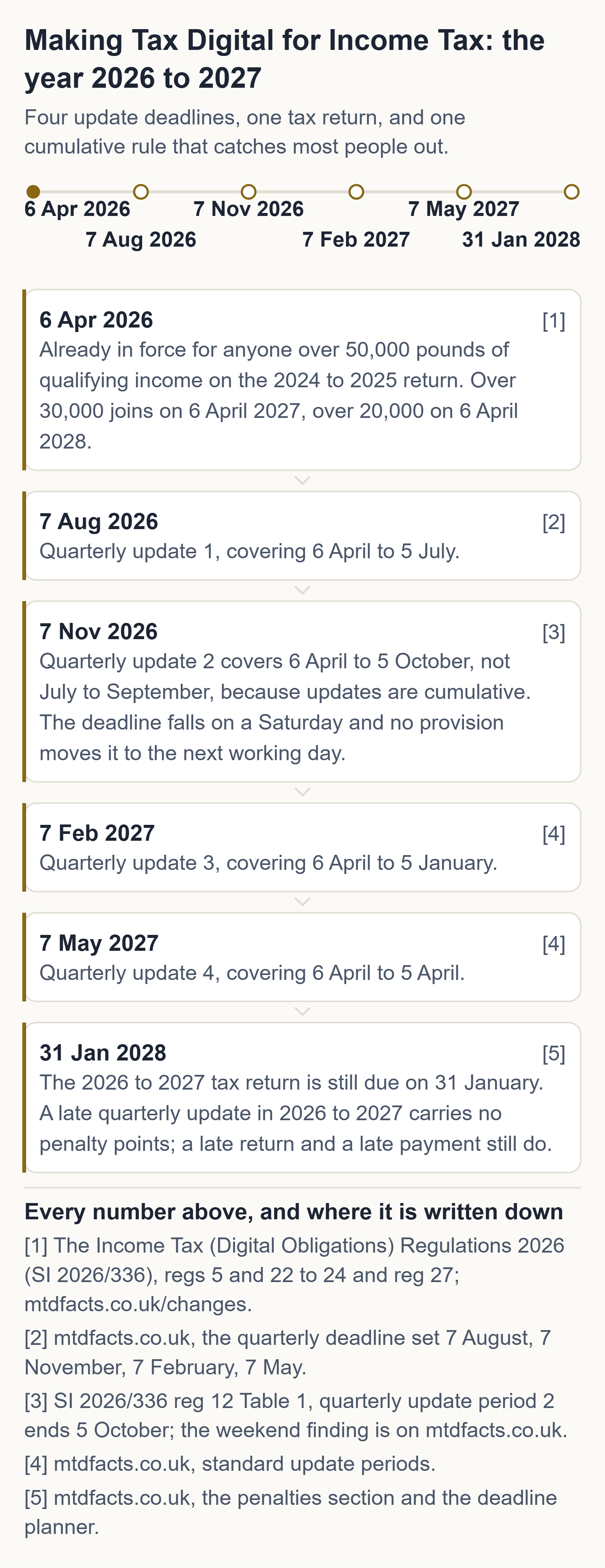
What to do tonight
one sitting, tonight, with the spreadsheet you already keep open in front of you
- Leave the spreadsheet exactly where it is. Nothing in the rules asks you to move your books into an accounting package; what they ask is that the figures reach HMRC through a digital link rather than by being retyped.
- Find your four totals for the period — income and expenses by category. That, and nothing more, is what a quarterly update carries.
- Open HMRC's own finder and filter it to products that connect to records you already keep. Filter that list for a free version too: bridging tools that cost £0 are on it.
None of those three steps costs money. Anyone charging you to do them is selling you something HMRC gives away.
Where these come from, on GOV.UK: quarterly updates and their deadlines · the tax return · who has to use MTD, and when · working out qualifying income · the recognised-software finder · what to do if HMRC signed you up.
The free route, before anyone sells you a subscription
HMRC publishes the official list of software recognised for Making Tax Digital for Income Tax, and its own guidance says plainly that “free products are available for those with simple tax affairs”. We drove that finder ourselves on 20 October 2026 and it returns recognised products costing £0 — for sole traders and for landlords, including bridging tools that submit straight from a spreadsheet you already keep. We take no commission from any of them, we rank none of them, and this site carries no affiliate links.
HMRC's official software finder (gov.uk) · how bridging software works · the free two-number check · your own four dates
Signing up for Making Tax Digital is free at GOV.UK. So is the checker on this page, and so is every answer on this site.
Bridging software is a small tool that takes the totals out of the spreadsheet you already keep and sends them to HMRC. You do not have to move your books into an accounting package. The one thing you cannot do is copy the figures across by hand: the link between your records and your submission has to be digital.
What it actually is
The word does more damage than the thing. Bridging software is not a system to learn and it is not an accounting package. It reads the totals you have already worked out and passes them to HMRC, and that is the whole of its job.
The before and after, on one spreadsheet
Before. You keep a sheet with a date, an amount and a category against each line of income and expense, exactly as you do now. At the end of the period you take the totals for each category.
After. The bridging tool reads those totals out of the sheet — through a formula, an import, or an add-in inside the spreadsheet itself — and sends them as the quarterly update. Nothing is retyped, and your books never leave the spreadsheet.
What travels: category totals for income and expenses, and nothing else. No receipts, no adjustments, no tax return. The tax return is a separate, later submission.
The rule that actually bites: the digital link
Once a digital record has been created and sent to HMRC in a quarterly update, you must not move it by hand. HMRC gives two explicit examples of what is not allowed: copying information by writing it out in another cell or in other software, and using cut and paste or copy and paste to move records.
What does count as a digital link: linked cells in spreadsheets, emailing a spreadsheet of digital records for import into another product, putting records on a portable device that someone else imports, XML or CSV import and export, downloading and uploading files, an automated data transfer, and an API transfer. The full digital records rules →
What the bridging products in our table cost
Four of the ten products we priced on the provider's own page connect to records you already keep. They are pulled out below, on the same terms as the rest: every price read on the provider's own page, with the time we read it. The full table of every product we priced is on the free-software page.
No affiliate links. No commission. No paid placements.
No product on this page paid to be here, and none was asked to. We take no commission and we rank no product: the table is ordered by what it costs and by nothing else. Every price on it was read on the provider's own page at the time shown beside it, and every product on it came from HMRC's own recognised-software finder rather than from anyone's marketing. If that ever changes, this paragraph changes first, and the date it changed stays on the page.
| Product | What it costs | The condition on the free version | UK property | Foreign property | Final declaration | Bridging or full | Where we read it, and when |
|---|---|---|---|---|---|---|---|
| My Tax Digital | Free | None disclosed on the page. | Yes | Yes — foreign property, SA106 | Not stated on the page | Bridging and full | mytaxdigital.co.uk read 8 September 2026, 22:26 BST |
| 123 Sheets | About £20 plus VAT a year — not verified at source: both of the vendor's pricing pages returned an error the night we read them, so this figure is second-hand and we say so rather than print it as ours | None. There is no free version. | Yes | Not stated on the page | Yes | Bridging, from Excel | 123sheets.com read 8 September 2026, 22:33 BST, pricing pages returning an error |
| VitalTax | £30 plus VAT a year for one National Insurance number, up to £198 plus VAT for an unlimited agent licence | The first quarterly submission is free, with no obligation or commitment. That is a trial, not a free tier. | Yes | Yes — UK and foreign property businesses | Yes | Bridging, an Excel add-in | vitaltax.uk read 8 September 2026, 22:28 BST |
| Coconut | Bridging £49.99 a year · filing £12.99 a month or £129.99 a year · the full plan £159.99 a year | Free for two years if you open a Zempler bank account from inside Coconut. | Yes, SA105 | Not stated on the page | Yes — the bridging plan charges £49.99 on top for it | Bridging and full | getcoconut.com read 8 September 2026, 22:27 BST |
How to read the table. What it costs is the price printed on the provider's own page on 8 September 2026, at the time in the last column. The condition is what that page attaches to the free version. Not stated on the page means exactly that — the provider did not say, and we have not guessed on their behalf. A free first submission is a trial and is recorded as one, not counted as a free version.
What you give up by staying on the spreadsheet
HMRC's own material is straight about the trade-off, and so are we: a spreadsheet will not have the time-saving features an all-in-one bookkeeping app has — bank feeds, receipt capture, invoicing. Bridging keeps your existing system working; it does not modernise it. For four submissions and a final declaration, that is often exactly the right trade.
Which MTD software is free → The spreadsheet rules in full →
Questions people ask
Can I use a spreadsheet for Making Tax Digital?
Yes, if bridging software makes the submissions and your records are connected by digital links rather than copy and paste.
Is copy and paste allowed under MTD?
No. Once a digital record has been sent to HMRC in a quarterly update you must not move it by cut and paste, copy and paste, or by writing it out again elsewhere.
Is there free bridging software?
One of the ten products we priced on the provider's own page on 8 September 2026 is free and does both bridging and full record-keeping. The cheapest bridging price we verified on a provider's own page is £30 plus VAT a year.
Can I still use bridging software for MTD?
Yes — bridging is a recognised route for Income Tax as well, and it exists precisely so that you can keep the spreadsheet you already have.
What is the best free bridging software for MTD in the UK?
We name no best; of the products we priced, the bridging-capable ones include a free option and a low-cost Excel add-in, each with its price and condition read on the provider's own page.
Is there bridging software for MTD Income Tax?
Yes, and the products that do it sit on HMRC's recognised list alongside the full accounting packages — our priced table marks which type each one is.
Can I use Excel spreadsheets for MTD?
Yes, as long as the totals reach HMRC through a digital link rather than being retyped, which is the whole job bridging software does.
Axion Labs
The word does more damage than the thing. "Bridging software" sounds like a system; it is a small tool that takes four totals out of the spreadsheet you already keep and sends them. You do not have to become a bookkeeper, buy a subscription, or learn an accounting package. If you can keep a spreadsheet — and you already do — the hard part is behind you.
Sources
- Use Making Tax Digital for Income Tax: create digital records (HMRC guidance)
- Choose the right software for Making Tax Digital for Income Tax (HMRC guidance)
- Find software that works with Making Tax Digital for Income Tax (HMRC tool)
Sources re-checked 20 October 2026: 16 of 16 unchanged since we read them.
General information about UK tax rules, not tax advice. Your own circumstances and HMRC's official guidance govern your position. If you are unsure, speak to an accountant or contact HMRC. Tax rules change — if this page is more than a few months old, check the GOV.UK pages linked above. Found an error? Email hello@getaxionlabs.com and we will correct it.
← All Making Tax Digital answers
Thank you. That goes straight to the person who writes these pages.
That didn't send — try once more.