Free MTD software: which ones, for whom, and what it costs
… there were zero free options. Is paying really the only option?
— MoneySavingExpert forum, 9 September 2025
Eight of the ten products we priced have a version that costs £0.
Nothing is sent anywhere and nothing is stored. All three answers are printed below whether you use this or not.
● On what you have told us, this is the one.
The products at £0 in the table cover what you have describedHere is what they leave out. On the free plans VAT, payroll and extra users are the paid extras; one caps you at 200 ledger entries and charges separately for bank feeds (quickfile.co.uk, read 8 September 2026); two are free only for as long as you hold a particular bank account. None of that stops you sending four quarterly updates and a final declaration.
This is published pricing, not advice about your affairs.
● On what you have told us, this is the one.
A bridging tool keeps your spreadsheetYou keep the sheet you already have and the tool sends the totals out of it. The cheapest bridging price we verified on a provider's own page is £30 plus VAT a year (vitaltax.uk, read 8 September 2026), and one product in the table does bridging at no charge. What you give up is what a spreadsheet has always lacked: bank feeds, receipt capture, invoicing.
This is published pricing, not advice about your affairs.
● On what you have told us, this is the one.
Full accounting software — more than Making Tax Digital asks of youOn the prices in the table below, full accounting software runs from £10 a month, or £100 a year (freeagent.com), up to £159.99 a year (getcoconut.com), both read 8 September 2026. What the extra buys is bookkeeping, not compliance: bank feeds, invoicing, receipt capture and an accountant's login. VAT registration and more than one business are the two answers that most often take a free tier away — but not always, so read the condition column before you assume it.
This is published pricing, not advice about your affairs.
Checked against GOV.UK on 20 October 2026 · every price read on the provider's own page on 8 September 2026 · Applies from 6 April 2026 onwards.
“having done the HMRC's own questionnaire to filter the best software for my circumstances there were zero free options. Is paying really the only option?”
We hear this most. a sole trader who had already tried the official tool, MoneySavingExpert forum, 9 September 2025 — someone in the same position as you.
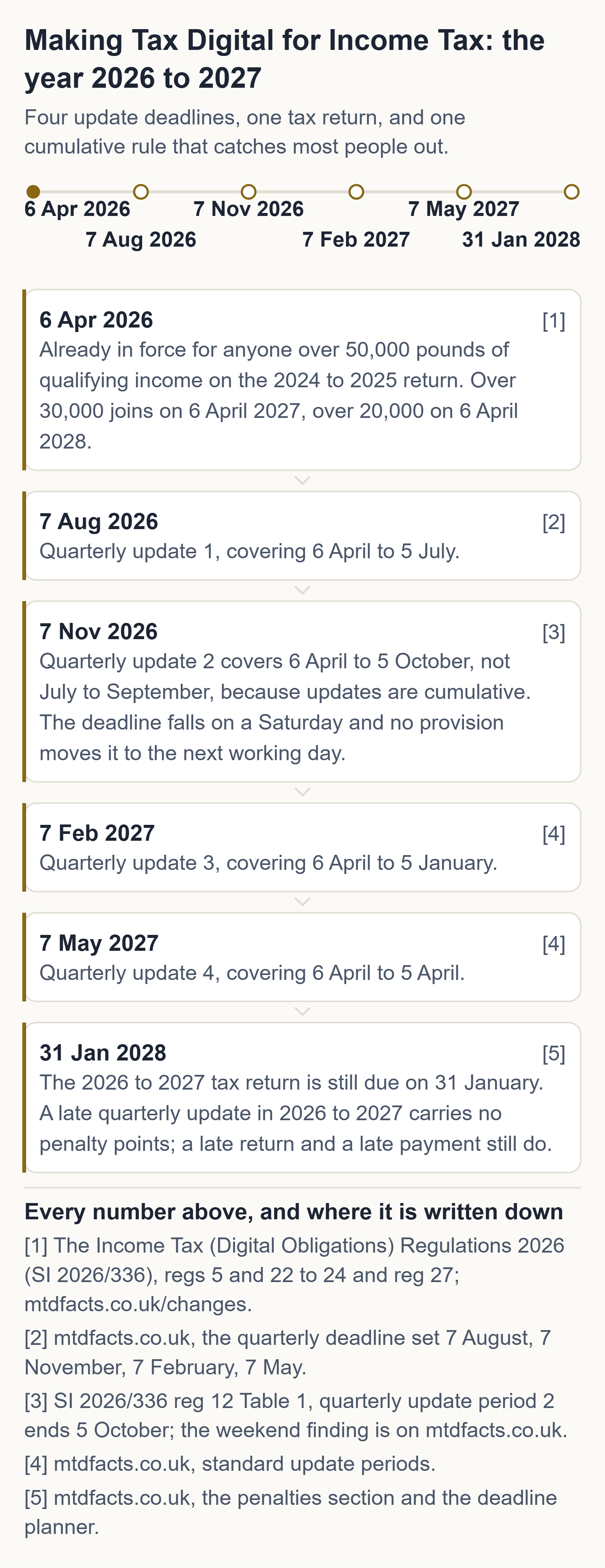
Free or paid, the software has to hit these dates and no others. Your next quarterly update is due 7 November 2026, and because updates are cumulative it covers 6 April to 5 October 2026 — so it also catches up 7 August 2026 if you missed it. Your tax return for 2026 to 2027 is due 31 January 2028, and that one is still in the points system. And from September 2026 HMRC has been signing people up itself, in stages, if they had not signed up.
You are not alone, and this is the measured version of that sentence. HMRC put 864,000 sole traders and landlords in scope for this tax year (HMRC, 5 February 2026), and reported on 12 August 2026 that 436,000 had sent a first quarterly update and 570,000 had signed up. We have not subtracted one from the other to make a "how many are behind" headline — they were published six months apart and count different things — but you can see the size of the room you are standing in.
What to do tonight
one sitting, tonight, and the answer at the end of it may be nothing at all
- Open HMRC's own recognised-software finder and set the filter to a free version, before you open anyone's sales page. If the finder returns you nothing, one of your other filters did it — usually VAT registration, an agent, or a business type the free tiers leave out.
- Drop that one filter and look again. Then check the condition attached to whichever product comes back: a turnover line, a bank account, a single business, a transaction cap. The condition is the part that never reaches the headline.
- Check it covers every income source you actually have — a let abroad is a second property business with its own quarterly updates, and the product pages we priced are largely silent on it — six of the ten did not say either way.
None of those three steps costs money. Anyone charging you to do them is selling you something HMRC gives away.
Where these come from, on GOV.UK: quarterly updates and their deadlines · the tax return · who has to use MTD, and when · working out qualifying income · the recognised-software finder · what to do if HMRC signed you up.
The free route, before anyone sells you a subscription
HMRC publishes the official list of software recognised for Making Tax Digital for Income Tax, and its own guidance says plainly that “free products are available for those with simple tax affairs”. We drove that finder ourselves on 20 October 2026 and it returns recognised products costing £0 — for sole traders and for landlords, including bridging tools that submit straight from a spreadsheet you already keep. We take no commission from any of them, we rank none of them, and this site carries no affiliate links.
HMRC's official software finder (gov.uk) · how bridging software works · the free two-number check · your own four dates
Signing up for Making Tax Digital is free at GOV.UK. So is the checker on this page, and so is every answer on this site.
Free MTD software exists, and the products that offer it are on HMRC's own recognised list. Each one is free under a condition — a bank account, a single business, no VAT, a cap on how much you can put through it — and the condition is the part that does not make it into the headline. This page prints it beside the price, with the provider page we read it on and the time we read it.
Every product we could price, and what its free version costs you
We read the price on the provider's own page for ten HMRC-recognised products on 8 September 2026. Eight of them have a version that costs £0, and three of those eight say on their own page that they cover a let abroad as well as one in the UK. Every product here came from HMRC's own recognised-software finder rather than from anyone's marketing.
No affiliate links. No commission. No paid placements.
No product on this page paid to be here, and none was asked to. We take no commission and we rank no product: the table is ordered by what it costs and by nothing else. Every price on it was read on the provider's own page at the time shown beside it, and every product on it came from HMRC's own recognised-software finder rather than from anyone's marketing. If that ever changes, this paragraph changes first, and the date it changed stays on the page.
| Product | What it costs | The condition on the free version | UK property | Foreign property | Final declaration | Bridging or full | Where we read it, and when |
|---|---|---|---|---|---|---|---|
| My Tax Digital | Free | None disclosed on the page. | Yes | Yes — foreign property, SA106 | Not stated on the page | Bridging and full | mytaxdigital.co.uk read 8 September 2026, 22:26 BST |
| Clear Books Free | £0 for as long as you use it; paid plans from £5 a month | The free plan is the whole MTD job; VAT, payroll and extra users are on the paid plans. | Yes | Yes — UK and overseas residential lets | Yes — prepared from the four quarterly updates | Full | clearbooks.co.uk read 8 September 2026, 22:21 BST |
| Zoho Books Free | £0 a month; the Standard plan is £12 a month | Described on the page as free accounting software for solopreneurs and micro businesses. No turnover limit was printed on the pricing page the night we read it. | Yes | Not stated on the page | MTD for Income Tax is listed on the free plan | Full | zoho.com read 8 September 2026, 22:29 BST |
| Sage Sole Trader Free | Free — the page says completely free, no billing | Described on the page as ideal for non-VAT-registered sole traders. | A separate landlord edition is linked from the same page | Not stated on the page | Not stated on the page | Full | sage.com read 8 September 2026, 22:33 BST |
| QuickFile XS | Free; the next tier up is £60 plus VAT a year | Up to 200 ledger entries. Bank feeds are £15 plus VAT a year on top. | Yes, set up by hand | Not stated on the page | Listed on the page as MTD (ITSA) ready | Full | quickfile.co.uk read 8 September 2026, 22:29 BST |
| RentalBux | Free — the page says free until March 2028 | Joint-ownership splits and the advanced reporting are on paid plans, and the paid price is not shown on the page. | Yes | Yes | Yes | Full, built for landlords | rentalbux.com read 8 September 2026, 22:28 BST |
| FreeAgent, landlord edition | £10 a month, or £100 a year — or nothing at all | Free for as long as you hold a NatWest, RBS or Ulster Bank business account, or a Mettle account used at least once a month. The introductory rate on the page is £5 a month. | Yes | Not stated on the page | Yes | Full | freeagent.com read 8 September 2026, 22:26 BST |
| 123 Sheets | About £20 plus VAT a year — not verified at source: both of the vendor's pricing pages returned an error the night we read them, so this figure is second-hand and we say so rather than print it as ours | None. There is no free version. | Yes | Not stated on the page | Yes | Bridging, from Excel | 123sheets.com read 8 September 2026, 22:33 BST, pricing pages returning an error |
| VitalTax | £30 plus VAT a year for one National Insurance number, up to £198 plus VAT for an unlimited agent licence | The first quarterly submission is free, with no obligation or commitment. That is a trial, not a free tier. | Yes | Yes — UK and foreign property businesses | Yes | Bridging, an Excel add-in | vitaltax.uk read 8 September 2026, 22:28 BST |
| Coconut | Bridging £49.99 a year · filing £12.99 a month or £129.99 a year · the full plan £159.99 a year | Free for two years if you open a Zempler bank account from inside Coconut. | Yes, SA105 | Not stated on the page | Yes — the bridging plan charges £49.99 on top for it | Bridging and full | getcoconut.com read 8 September 2026, 22:27 BST |
How to read the table. What it costs is the price printed on the provider's own page on 8 September 2026, at the time in the last column. The condition is what that page attaches to the free version. Not stated on the page means exactly that — the provider did not say, and we have not guessed on their behalf. A free first submission is a trial and is recorded as one, not counted as a free version.
The two columns no other comparison carries
Every comparison table we read on this question — the vendor pages, the review sites and the accountancy guides — states its prices with no source and no read date, and not one of them has a foreign-property column. Both are in the table above. The foreign column matters because a let abroad is legally a separate property business with its own quarterly updates, so the real question is not "does this product handle foreign property" but "does it handle two property businesses in one account" — and no vendor comparison asks it.
The read time matters for the opposite reason: a price with no date is a price you cannot check. Ours can be checked in a minute, and if one has moved, tell us and we will correct it that day.
Four emails a year, and nothing else
One three weeks before each of your four quarterly update deadlines — the dates are fixed and this site already works them out — and one when a price in this table changes, with what changed and the date we read it. No newsletter, no offers, no third parties, and one click unsubscribes.
Nothing on this page is behind that field. Written and sent by Axion Labs; reply to any of them and one person reads it. We store the address and nothing else — no name, no figures, no tracking — and no email has been sent from this list yet: the sending step is not built, and we would rather say so than imply a welcome message that is not coming.
When the HMRC finder tells you there are no free options
One reader on the MoneySavingExpert forum put it like this: having done the HMRC's own questionnaire to filter the best software for my circumstances there were zero free options. Is paying really the only option?
That is the ordinary experience of the official tool, and it is almost always one filter doing it rather than the market.
The three filters that empty the list
- VAT registration. Several free tiers are for non-VAT-registered users and drop out the moment the box is ticked. If you are VAT registered, check whether the product you already use for VAT also covers MTD for Income Tax — that is often the cheaper answer than a second product.
- An agent licence. Filtering for a product an accountant can use on your behalf takes the free tiers out, because they are single-user.
- An income type the free tiers leave out. Foreign property is the usual one. It is a separate property business with its own quarterly updates, and six of the ten product pages we read do not state it either way — which is why it has a column of its own in the table above.
Drop the one filter that is not actually required of you, look again, and read the condition on whatever comes back. → HMRC's official software finder (gov.uk)
What "free" is doing in each case
It is not one thing. On some products the free plan is the whole Making Tax Digital job and the paid plans add VAT, payroll or extra users. On others the price is nothing while you hold a particular bank account, and returns the day you close it. On one it is free until a stated date and the paid price is not published. A free first submission is a trial, not a free version, and it is recorded in the condition column as a trial rather than counted as free.
Free software is not the same as a free obligation. Signing up for Making Tax Digital is free on GOV.UK, the answers on this site are free, and none of the three steps above costs anything.
What HMRC itself says about the free products
HMRC's own guidance says free products are available for those with simple tax affairs, and that there may be limits on how the product can be used — a limited number of transactions, for instance. It also states plainly that it does not recommend any product or software provider. Neither do we.
Free MTD software for sole traders and the self-employed
“Sole trader” is HMRC’s word and “self-employed” is the one people type; here they are the same person, and Making Tax Digital software for self-employed work is the same list as the one above. Nothing in that table is restricted to a particular trade — what decides it for a sole trader is the condition beside the price, not the price. Two conditions rule out more sole traders than the rest put together: being VAT registered, and needing an agent licence so an accountant can file for you. Both are in the three filters above, and both are worth testing before you accept that nothing free applies to you.
Free MTD software for landlords
A landlord’s extra question is not the price, it is whether the product covers the properties you actually have. Your UK lets are one property business; a foreign let is a separate property business with its own quarterly updates, and the table above carries a column for it because no vendor comparison we read asked the question at all. On this page, read that column before the cost column. The rules themselves are on the landlord page.
The cheapest MTD software, the simplest, and what it costs
We rank no product and take no commission, so “best free MTD software” is not a verdict we will sell you. What we can hand you is the thing a ranking stands in for: the whole priced list, ordered by what it costs, with the condition attached to each free version and the provider page and the time we read it on. The cheapest MTD software in that table costs nothing at all; whether the cheapest one is the right one for you is settled in the condition column, not the cost column.
Is there free software for Making Tax Digital?
Yes. Free versions of HMRC-recognised products exist, and HMRC’s own guidance says so for people with simple tax affairs. What does not exist is HMRC free accounting software: HMRC has no product of its own and does not intend to build one, so “HMRC free MTD software” always means a recognised third-party product with a free tier rather than an HMRC app.
What MTD software should cost you → Keep your spreadsheet instead →
Questions people ask
Is there genuinely free MTD software?
Yes. Of the ten HMRC-recognised products we priced on the provider's own page on 8 September 2026, eight had a version costing £0. Each one attaches a condition — a bank account, a single business, no VAT, or a cap on entries — and the condition is in the table on this page.
Why did HMRC's software finder return no free options for me?
Usually one filter did it: VAT registration, an agent licence, or an income type the free tiers exclude, such as foreign property. Drop the filter that is not actually required of you and look again.
Does HMRC have its own free MTD software?
No. HMRC works with commercial software providers instead, and only a product on its recognised list can send anything to HMRC.
Is Sage MTD software really free?
The Sage sole-trader edition says on its own page that it is completely free with no billing, and the condition it prints is that it is aimed at sole traders who are not VAT registered.
What software does HMRC recommend for MTD?
None: HMRC recognises products and publishes a finder for them, and it says plainly that it does not recommend any product or software provider.
Can I still use Excel for MTD?
Yes, provided bridging software sends the totals out of the spreadsheet and nothing between your records and the submission is retyped by hand.
How much will MTD software cost?
It can be nothing: the table above prices ten recognised products and eight of them have a version costing £0, with the condition printed beside each.
What is the best bookkeeping software for a sole trader?
We do not name a best; the table above gives every price with its condition instead, because for a sole trader the condition — VAT registration, one business, a cap on entries — is what decides it.
Do sole traders have to use MTD?
Only once gross self-employment and property income passes the threshold for that phase; below it a sole trader carries on with the tax return alone.
Is there any free MTD software that is HMRC-recognized?
Yes — the ten products in the table above are on HMRC's recognised list, and eight of them have a version that costs nothing.
Can I use Excel spreadsheets for MTD?
You can keep the spreadsheet; what you cannot do is type the figures into a submission by hand, which is why bridging software exists to make the link digital.
What is the best MTD software for sole traders?
There is no ranking here and no commission taken — the sole-trader section above sets out the two conditions that most often remove a free tier, and the table shows which products carry them.
What is the best free accounting software for sole traders?
Read the table above by condition rather than by name: a free tier written for sole traders who are not VAT registered is the right one only if you are not VAT registered.
Do I need to register for MTD with HMRC?
Yes, signing up is its own free step on GOV.UK; choose your software first, because you cannot send anything until the product is in place and authorised on your HMRC account.
Do I need special software for Making Tax Digital?
You need software HMRC recognises, which is narrower than special: a spreadsheet alone cannot submit, but a recognised bridging tool sitting over your spreadsheet can.
Can I use Excel for Making Tax Digital?
Yes, with bridging software over the top — what is required is a digital link between your records and the submission, not a particular kind of record.
Does HMRC have access to Xero?
We have not verified this yet.
What is the best free accounting software?
We take no commission and name no winner; the honest version of that answer is the whole priced list above, ordered by cost, with each free version's condition beside it.
Is Sage MTD free?
The Sage sole-trader edition is stated as free on the provider's own page, with a separate landlord edition linked from that same page.
What is the best free accounting software for landlords?
For a landlord the deciding column is not the price but foreign property, because a let abroad is a separate property business and several product pages do not say whether they cover it.
What is the cheapest MTD software for landlords?
The cheapest is free: the landlord-capable rows in the table above include products costing nothing, and what separates them is the condition attached rather than the price.
What is the best accounting software for landlords?
We rank nothing and take no commission; the landlord rows above give the price, the condition and whether a let abroad is covered, each read on the provider's own page.
Which MTD software is HMRC-approved?
Only products on HMRC's recognised list can send anything to HMRC, and the finder on GOV.UK is where you check a specific one.
Does MTD apply to landlords?
Yes, once your gross property income added to any self-employment income is over the threshold for that phase — your UK lets are one property business and a let abroad is another.
Do I have to buy software for MTD?
No: you have to use recognised software, and eight of the ten products we priced have a version that costs nothing.
Is Hammock HMRC approved?
We have not verified this yet.
How much does MTD software cost?
From nothing up to an annual full-plan price among the products in the table above, with every figure read on the provider's own page and the time of that reading recorded beside it.
What is the least expensive tax preparation software?
Within the recognised Making Tax Digital products we priced the least expensive costs nothing at all; we have priced no other kind of tax preparation software and do not claim to have.
Can I use an Excel spreadsheet for MTD?
Yes — keep the workbook and add bridging software, so the totals reach HMRC through a digital link rather than a retyped figure.
What is the best free software for preparing and filing Income Tax returns?
We name no best, and there is one limit worth checking in the table above: not every free product states whether it handles the final declaration as well as the quarterly updates.
What software do I need to make my tax digital?
One product on HMRC's recognised list that covers your income types — self-employment, UK property, a let abroad — and, if you want to keep your spreadsheet, one that does bridging.
Do I have to buy software for Making Tax Digital?
Not necessarily: free versions of recognised products exist, and the condition attached to each of them is in the column beside its price above.
Which MTD software is best for sole traders?
No ranking is offered here; the sole-trader section above names the two conditions that most often take a free tier away, which is the part a ranking tends to hide.
Does Making Tax Digital affect sole traders?
Yes, from the phase in which your gross income crosses the threshold — quarterly updates and digital records, in place of assembling everything once a year.
Do I need to buy software for Making Tax Digital?
Not if you can meet the condition attached to one of the free recognised products; those conditions are printed beside each price above.
Is Sage free for sole traders?
The Sage sole-trader edition is described on its own page as free, and the condition it prints is that it is for sole traders who are not VAT registered.
What is the best HMRC-approved MTD software for landlords?
We approve nothing and rank nothing; for a landlord the useful test is whether the product states that it covers a let abroad, which the table above records for every row.
What is the best free software for landlord accounting?
Read the free rows above against your own lets: a product built for landlords is the better choice only if it also states that it handles the properties you actually have.
What is the best free software to submit accounts to HMRC?
Nothing on this page is a recommendation — but only a recognised product can submit at all, so start from the finder on GOV.UK and then read the conditions above.
What accounting software does HMRC recommend?
None. HMRC says it does not recommend any product or software provider, and neither do we.
What is the best HMRC-approved software for self-assessment tax returns?
We have not verified this yet.
Does Making Tax Digital apply to self-employed?
Yes, to self-employed people whose gross self-employment and property income is over the threshold for that phase — sole trader is HMRC's word for the same person.
What is the best tax software for self-employed?
We name no best; the table above holds the price, the condition and the read date for each recognised product instead, which is the part a recommendation usually leaves out.
What is the best software for making taxes digital for sole traders?
There is no winner here on purpose — the sole-trader section above tells you which conditions to test first, and the table shows which products attach them.
What is the best free MTD software for landlords?
For a landlord the free rows above narrow on one question: does the product state that it handles a foreign let, which is a separate property business with its own quarterly updates.
Which MTD software is easiest to use?
We have not verified this yet.
What is the best accounting software for landlords in the UK?
We rank nothing and take no commission; the landlord rows above give the price, the condition and the foreign-property answer, each read on the provider's own page and dated.
Will HMRC provide free software for MTD?
No — HMRC has no product of its own and works through commercial providers, so free HMRC software in practice means a recognised third-party product with a free tier.
Can I use a FreeAgent for Making Tax Digital?
The FreeAgent landlord edition is in the table above, and its page states it is free for as long as you hold one of the named bank accounts, with a monthly or annual price otherwise.
Do I have to pay for software for Making Tax Digital?
Not if a free tier fits you: eight of the ten products we priced have a version costing nothing, and the condition on each is printed beside it.
How much will accountants charge for MTD?
We have not verified this yet.
Axion Labs
We priced this table ourselves, on each provider's own page, on one evening, and we wrote the time of every read next to it so you can check us rather than take our word. We take no commission from any of them and none of them paid to be here — which is why we can tell you plainly that a product's free tier leaves something out, and where. If a price on this page has moved since we read it, tell us and we'll fix it that day.
Sources
- Find software that works with Making Tax Digital for Income Tax (HMRC tool)
- Choose the right software for Making Tax Digital for Income Tax (HMRC guidance)
- Use Making Tax Digital for Income Tax: create digital records (HMRC guidance)
Sources re-checked 20 October 2026: 16 of 16 unchanged since we read them.
General information about UK tax rules, not tax advice. Your own circumstances and HMRC's official guidance govern your position. If you are unsure, speak to an accountant or contact HMRC. Tax rules change — if this page is more than a few months old, check the GOV.UK pages linked above. Found an error? Email hello@getaxionlabs.com and we will correct it.
← All Making Tax Digital answers
Thank you. That goes straight to the person who writes these pages.
That didn't send — try once more.