Making Tax Digital software: what counts, and what costs £0
why is there not a simple software that one can use?
— OpenRent Community forum, 1 August 2026
Three kinds of product exist, and eight of the ten we priced have a version at £0.
Nothing is sent anywhere and nothing is stored. All three answers are printed below whether you use this or not.
● On what you have told us, this is the one.
The products at £0 in the table cover what you have describedHere is what they leave out. On the free plans VAT, payroll and extra users are the paid extras; one caps you at 200 ledger entries and charges separately for bank feeds (quickfile.co.uk, read 8 September 2026); two are free only for as long as you hold a particular bank account. None of that stops you sending four quarterly updates and a final declaration.
This is published pricing, not advice about your affairs.
● On what you have told us, this is the one.
A bridging tool keeps your spreadsheetYou keep the sheet you already have and the tool sends the totals out of it. The cheapest bridging price we verified on a provider's own page is £30 plus VAT a year (vitaltax.uk, read 8 September 2026), and one product in the table does bridging at no charge. What you give up is what a spreadsheet has always lacked: bank feeds, receipt capture, invoicing.
This is published pricing, not advice about your affairs.
● On what you have told us, this is the one.
Full accounting software — more than Making Tax Digital asks of youOn the prices in the table below, full accounting software runs from £10 a month, or £100 a year (freeagent.com), up to £159.99 a year (getcoconut.com), both read 8 September 2026. What the extra buys is bookkeeping, not compliance: bank feeds, invoicing, receipt capture and an accountant's login. VAT registration and more than one business are the two answers that most often take a free tier away — but not always, so read the condition column before you assume it.
This is published pricing, not advice about your affairs.
Checked against GOV.UK on 14 August 2026 · Applies from 6 April 2026 onwards.
“why is there not a simple software that one can use?”
We hear this most. a landlord who banks online and has done for 34 years, OpenRent Community forum, 1 August 2026 — someone in the same position as you.
Whatever software you end up choosing, it has to hit these dates. Your next quarterly update is due 7 November 2026, and because updates are cumulative it covers 6 April to 5 October 2026 — so it also catches up 7 August 2026 if you missed it. Your tax return for 2026 to 2027 is due 31 January 2028, and that one is still in the points system. And from September 2026 HMRC has been signing people up itself, in stages, if they had not signed up.
You are not alone, and this is the measured version of that sentence. HMRC put 864,000 sole traders and landlords in scope for this tax year (HMRC, 5 February 2026), and reported on 12 August 2026 that 436,000 had sent a first quarterly update and 570,000 had signed up. We have not subtracted one from the other to make a "how many are behind" headline — they were published six months apart and count different things — but you can see the size of the room you are standing in.
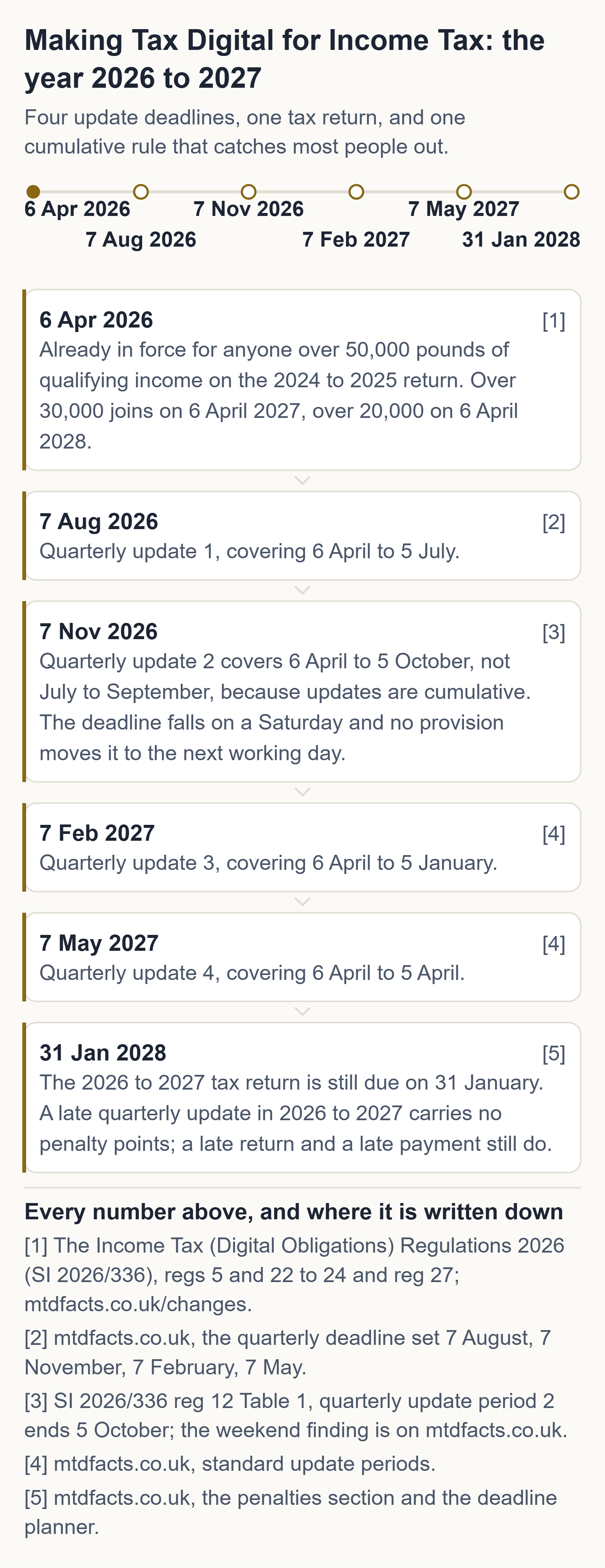
What to do tonight
half an hour, tonight, and you may not need to spend a penny
- Open HMRC's own recognised-software list before you open anyone's sales page. It is the only list that decides what can actually send an update.
- Filter it for products that cost £0. They exist, for sole traders and for landlords, including bridging tools that submit straight from a spreadsheet you already keep.
- If your records are already in a spreadsheet, keep the spreadsheet. Bridging software is built exactly for that, and nothing in the rules requires you to move to a monthly subscription.
None of those three steps costs money. Anyone charging you to do them is selling you something HMRC gives away.
Where these come from, on GOV.UK: quarterly updates and their deadlines · the tax return · who has to use MTD, and when · working out qualifying income · the recognised-software finder · what to do if HMRC signed you up.
The free route, before anyone sells you a subscription
HMRC publishes the official list of software recognised for Making Tax Digital for Income Tax, and its own guidance says plainly that “free products are available for those with simple tax affairs”. We drove that finder ourselves on 1 September 2026 and it returns recognised products costing £0 — for sole traders and for landlords, including bridging tools that submit straight from a spreadsheet you already keep. We take no commission from any of them, we rank none of them, and this site carries no affiliate links.
HMRC's official software finder (gov.uk) · how bridging software works · the free two-number check · your own four dates
Signing up for Making Tax Digital is free at GOV.UK. So is the checker on this page, and so is every answer on this site.
There is no HMRC app. Every MTD submission goes through commercial software that has been through HMRC's recognition process, and HMRC does not recommend any product.
The short version, before the rules
If all you need to do is send four sets of figures and a final declaration, products on HMRC's own recognised list do that for £0. If you keep your books in a spreadsheet and want to keep it that way, a bridging tool sends the totals out of it. Full accounting software does a great deal more than Making Tax Digital requires, and costs accordingly. Which of the three you need depends on the three questions above, and this page settles what each of them is.
→ Every product we could price, what its free version costs and the condition attached · keep the spreadsheet instead
We take no commission, rank no product and carry no affiliate links.
What “HMRC-recognised software” actually means
It is a specific status, not a marketing phrase. HMRC publishes a list of products that have been through its recognition process for Making Tax Digital for Income Tax, and only a product on that list can send anything to HMRC. A spreadsheet cannot. A bank app cannot. An accountant's portal cannot, unless the product behind it is on the list.
How to check a product is genuinely recognised
- Open HMRC's own software finder on GOV.UK — not the vendor's page, which is where the phrase gets used loosely.
- Filter for what you actually need: your income types (sole trader, UK property, foreign property), whether you want it to create digital records or just bridge from a spreadsheet, your update periods, and whether it can also file the tax return.
- Filter for a free version if cost matters. HMRC's guidance says plainly that free products are available for those with simple tax affairs, though there may be limits — a capped number of transactions, for instance.
HMRC states that it does not recommend any product or software provider. Neither do we: this site takes no commission, carries no affiliate links, and ranks nothing.
The same status gets written several ways. MTD compatible software, MTD compliant software, HMRC MTD software and HMRC recognised software all mean the one thing here and on GOV.UK: a product that has been through HMRC’s recognition process and appears on its list. Nothing outside that list can send a submission, whatever a vendor page calls it — and a vendor page calling itself compatible is not the same as HMRC listing it.
What your software has to do
- Create, store and correct digital records of your self-employment and property income and expenses
- Send your quarterly updates to HMRC
- Let you add your other income sources and submit your tax return by the following 31 January
Two types
Software that creates digital records
You build records by linking a business bank account to import transactions, scanning receipts and invoices, or typing income and expenses in. These products usually do everything — records, updates and the tax return.
Software that connects to your records — "bridging software"
This connects to records you already keep in spreadsheets or other accounting tools and makes the submissions for you. Some bridging products can send quarterly updates and submit the tax return.
Free options
HMRC's guidance says free products are available for those with simple tax affairs, but there may be limits on how the product can be used — for example a limited number of transactions. Free products are marked with a "free version" feature in HMRC's software finder. As one worked example, the finder lists My Tax Digital (Free) with a free version, digital record creation and bridging, standard and calendar update periods, and sole trader, UK property and foreign property income — checked on 14 August 2026.
We do not rank, review or take commission on any software. The recognised list changes; always confirm current features and pricing on HMRC's finder and with the provider before you commit.
Features worth checking before you pick
- It supports all your income sources — a landlord thinking of also trading should check that too
- It can make both submissions: quarterly updates and the tax return
- It lets you report your other income to complete the return
- It works with your accounting period — standard, calendar, or neither
- It allows multiple agents, if you use more than one
- Whether it has HMRC Assist built in, which flags errors using your submissions and HMRC's data
- If you are VAT registered: whether your existing VAT software also covers MTD for Income Tax
Using more than one product
Allowed — but only one product per submission. A landlord cannot split property quarterly updates across two products. If you use more than one product you must digitally link them.
Four emails a year, and nothing else
One three weeks before each of your four quarterly update deadlines — the dates are fixed and this site already works them out — and one when the free-software list or a rule on this page changes, with what changed and the date we read it. No newsletter, no offers, no third parties, and one click unsubscribes.
Nothing on this page is behind that field. Written and sent by Andrew at Axion Labs; reply to any of them and one person reads it. We store the address and nothing else — no name, no figures, no tracking — and no email has been sent from this list yet: the sending step is not built, and we would rather say so than imply a welcome message that is not coming.
Which of it is actually free → If you want to keep your spreadsheet →
Questions people ask
Does HMRC have its own free MTD software?
No. HMRC works with commercial software providers instead. Free third-party products exist but may limit how much you can use them.
Can I use two different software products for MTD?
Yes, but only one product per submission, and you must digitally link the products you use.
What's the best software for Making Tax Digital?
We rank no product and take no commission, so in place of a winner you get the priced list, the condition attached to each free version, and the provider page every price was read from.
How much does software for Making Tax Digital cost?
It runs from nothing at all to an annual full-plan price among the products we priced, and every figure sits beside the provider page it came from on our free MTD software page.
Can I still use Excel for MTD?
Yes, if bridging software sends the totals out of the spreadsheet and the link between your records and the submission is digital rather than a figure retyped by hand.
Is Sage MTD software really free?
The Sage sole-trader edition states on its own page that it is completely free with no billing, and the condition it prints is that it is aimed at sole traders who are not VAT registered.
How much will MTD software cost?
That depends on which condition you can meet: several recognised products cost nothing for as long as their stated condition holds, and the paid tiers buy bookkeeping features rather than compliance.
Does MTD software have to be linked to a bank account?
Not as a rule — but on some products the free price is conditional on holding a particular bank account, so a bank link can be what makes a product free rather than what makes it work.
Do I have to buy software for MTD?
You have to use software HMRC recognises, but you do not have to buy it: free versions exist and they are on the same recognised list as the paid ones.
Which MTD software is HMRC-approved?
Only a product on HMRC's recognised list can send anything to HMRC, and the finder on GOV.UK is where you check a specific one — a spreadsheet, a bank app or an agent's portal cannot submit on its own.
What is the cheapest MTD software available?
The cheapest costs nothing: the free tiers we priced do the Making Tax Digital job in full, and what separates them is the condition each attaches, not the cost.
Andrew at Axion Labs
I don't sell software, take commission, or rank products, so I can say the plain thing: check HMRC's own list before anyone's sales page, and filter it for the free ones. They exist. If your records already live in a spreadsheet, bridging software is built for exactly that, and you do not have to move onto a monthly subscription to comply.
Sources
- Choose the right software for Making Tax Digital for Income Tax (HMRC guidance)
- Find software that works with Making Tax Digital for Income Tax (HMRC tool)
- Use Making Tax Digital for Income Tax: create digital records (HMRC guidance)
General information about UK tax rules, not tax advice. Your own circumstances and HMRC's official guidance govern your position. If you are unsure, speak to an accountant or contact HMRC. Tax rules change — if this page is more than a few months old, check the GOV.UK pages linked above. Found an error? Email hello@getaxionlabs.com and we will correct it.
← All Making Tax Digital answers
Thank you. That goes straight to the person who writes these pages.
That didn't send — try once more.